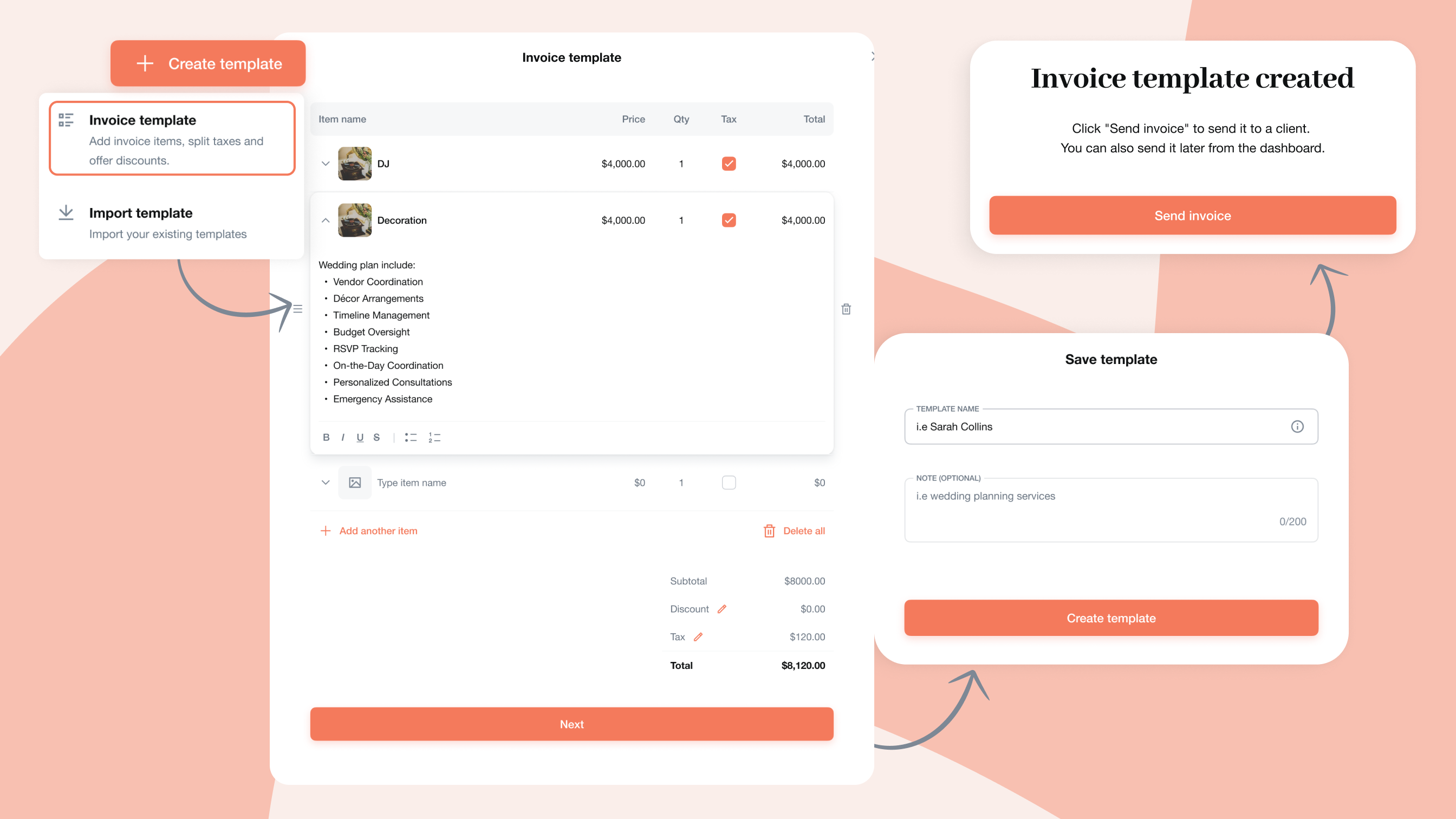
Creating invoices for weddings and events just got a whole lot easier. Invoice Templates are now available in the Templates hub in Maroo, where you can view all your existing invoice templates and quickly create new ones from a single, centralized space.
Whether you are a wedding planner, photographer, florist, or designer, most projects follow a similar structure: planning fees, design fees, production, day‑of coordination, travel, and more. With Invoice Templates, you can turn those recurring service lists into reusable templates that are ready to go every time you book a new client.
Invoice templates and recurring invoices solve different jobs. Templates help you reuse the same service package for different clients. If you bill an ongoing relationship on a repeating schedule, Maroo can create a new invoice for each billing cycle until the schedule ends. That makes recurring invoices useful for monthly retainers, venue packages, or other repeat services—not for duplicating a one-time wedding invoice. See the Invoices Help collection for current setup guidance.
Review every installment date before sharing the invoice; a reusable template, a payment schedule and recurring invoice generation serve different purposes.
In Maroo, mark one enabled payment method as Preferred to highlight it for clients while keeping other available methods open. The tag appears when that method is available for the invoice. For a Maroo invoice with more than one scheduled payment, Autopay applies to the payment schedule rather than an individual installment. Automatic collection is separate from recurring invoices, which generate new invoices on a repeating schedule. Watch the scheduled Autopay tutorial.
Instead of rebuilding line items from scratch, simply select the template that matches the service (full‑planning, month‑of coordination, photography collection, floral design) and everything is pre‑filled and consistent. You can also save a payment schedule in the template, so its due-date rules populate along with the line items when you create the invoice.
From the new Templates hub, you can create and manage all your itemized invoice templates in one place. Use the same familiar line‑item experience as quotes, then load those templates directly into invoices when you are ready to bill a client—no more digging around in old files or screenshots for “that last invoice.”
This saves time during busy seasons, reduces manual typing, and helps you send invoices faster so you can get paid sooner.
Templates help keep your pricing structure clear and consistent across clients, which is especially important when managing multiple weddings at different stages. Every invoice you send will reflect the same descriptions, tax setup, and discounts, so there is less room for mistakes or awkward corrections later.
For your clients, this consistency builds trust: they see the same clean, organized format every time, which reinforces your professionalism and makes it easier for them to understand exactly what they are paying for.
All your invoice‑related templates now live together inside Maroo, right where you already manage quotes and payments. As your business grows and you add new services or collections, you can update or create templates once and use them again and again.
It is a faster, more reliable way to create invoices every time, so you can spend less time on billing and more time designing unforgettable weddings and events.
Try it now: Create your first Invoice Template in Maroo.