
Maroo and Studio Ninja overlap in CRM, contracts, invoices, payments, and client records, but their strongest workflows are different.
Studio Ninja is photography-first CRM and automation software. Maroo focuses on wedding and event client finances plus contractor administration. This comparison uses official sources checked August 21, 2026; verify current prices, plan limits, and payment settings before deciding.
Maroo's Starter CRM and associated core features are free for businesses invoicing under $5,000 per month within published limits. It connects quotes, contracts, invoices, payments, reminders, and client records to contractor workflows.
The optional Business plan is $50 per month ($600 over 12 monthly payments), and raises limits while lowering published client-processing rates. Processing, contracts, tax documents, and other per-use charges can still apply.
Studio Ninja's current plans are designed for photographers and videographers. Its feature set includes leads, jobs, quotes, invoices, contracts, questionnaires, booking, schedules, reminders, workflows, a mobile app, accounting connections, and photography integrations.
Starter is $16 monthly or $160 yearly, Pro is $27 monthly or $270 yearly, and Master is $40 monthly or $400 yearly in the U.S. pricing view. A seven-day trial is available without a credit card.
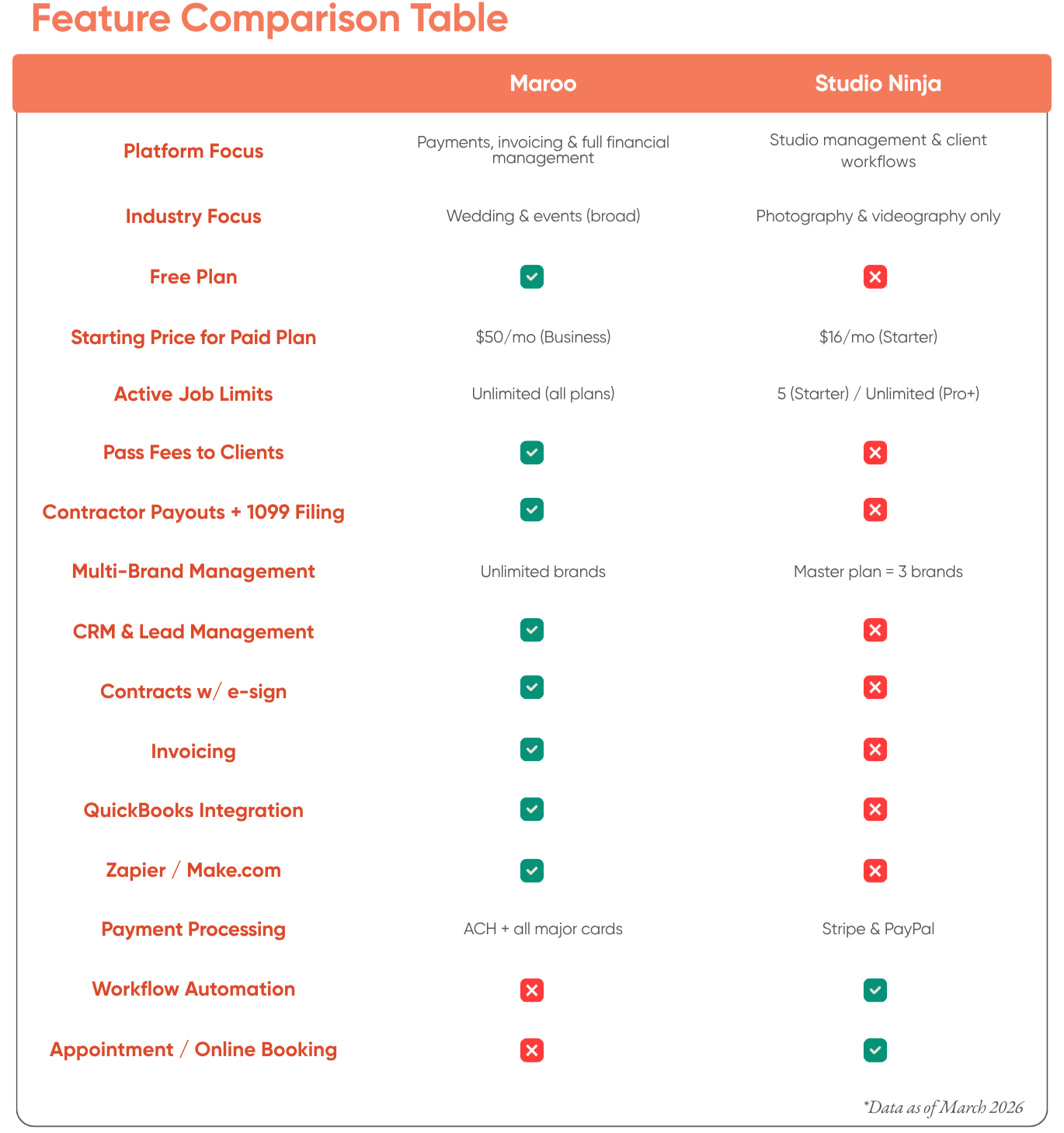
The former comparison was built around an outdated difference: Studio Ninja now supports passing card surcharges to clients.
Studio Ninja's payment-method guide covers Stripe card payments, bank-transfer instructions, other methods, Apple Pay, Google Pay, and client-facing transaction-fee options.
Its surcharge guide says domestic and international card percentages can be configured so the fee is added to client invoices automatically. Passing shifts the fee rather than eliminating it; confirm local rules and the exact Stripe configuration.
Maroo's published rates are 3.5% / 3.4% / 3.25% for client cards and 1.5% / 1.25% / 1.0% for client ACH on Starter / Business / Pro. Studio Ninja's current U.S. Stripe guide lists domestic cards at 2.9% + $0.30, with additional cases for manual entry, international cards, and currency conversion.
If a Maroo Business user passes every eligible processing fee and absorbs no other transaction fee, the business-side cost is only the $50 monthly subscription, or $600 per year; clients pay the shifted eligible fees. A Studio Ninja user who passes every eligible modeled Stripe card fee still pays the selected Studio Ninja subscription.
Studio Ninja is built around photography jobs, shoots, online booking, questionnaires, mobile work, and integrations such as Pic-Time, ShootProof, Fundy, and ProSelect.
Maroo serves photographers plus planners, videographers, florists, DJs, caterers, venues, and other event businesses. Its differentiation is financial and contractor administration rather than photography delivery.
Maroo's invoicing supports one-time invoices, installments, reminders, and recurring invoices. Recurring invoices are distinct from installments and Autopay.
Studio Ninja Pro and Master include workflow automation and online booking forms. Its invoice settings document payment schedules, reminders, and automatic receipts.
Studio Ninja's 2026 release record also documents right-away automation triggers, flexible payment scheduling, structured contact-form fields, split payments, and client-reply notifications.
Maroo provides CRM, reminders, Questionnaires, and published Zapier/Make/API options on applicable plans, but Studio Ninja remains the more photography-specific out-of-the-box automation and booking product.
You can give a lead form or questionnaire its own image and preview it with your selected fonts and colors before sharing it. Watch the form-image tutorial. Review email and in-app notification preferences for supported modules. Required security, billing, payout and tax notices remain enabled. A Maroo Project keeps a client’s contacts, documents, files and notes together. Start from scratch or create it from one eligible existing lead, quote, contract or invoice, then connect other records as needed.
A studio that pays second shooters, editors, associate photographers, or other contractors may need a connected payout and tax-document process.
Maroo supports B2B ACH contractor payouts within plan limits plus individual and bulk W-9 requests and published 1099 preparation, e-filing, and mailing options.
Studio Ninja's public pricing and help scope focuses on client jobs, documents, payments, workflows, and accounting connections; it does not present the same connected contractor payout plus W-9/1099 workflow. Maroo also publishes a QuickBooks Online integration; verify the exact sync behavior in both products.
The table compares U.S. annual business-side cost at three card-payment volumes. It is illustrative, not a quote or universal savings claim.
Studio Ninja uses Pro at $270 per year plus Stripe domestic cards at 2.9% + $0.30. Maroo uses Business at $600 per year plus cards at 3.4%. Payment counts are 40, 100, and 200 equal $2,500 transactions.
Two rows assume the business absorbs modeled card fees. Two rows assume every eligible card fee is shifted to the client and no other transaction fee is absorbed.
The examples exclude ACH, international cards, manually entered cards, BNPL, refunds, disputes, currency conversion, tax-document charges, and other provider fees.
At $100K / $250K / $500K: Studio Ninja Pro absorbed-card totals are $3,182 / $7,550 / $14,830; Maroo Business absorbed-card totals are $4,000 / $9,100 / $17,600. Qualified passed-fee totals are the subscriptions: $270 for Studio Ninja Pro and $600 for Maroo Business.
Studio Ninja can be less expensive on subscription and modeled domestic-card processing. Maroo may justify its higher subscription through contractor administration, free CRM entry, client ACH options, and broader event-financial workflow.
When both platforms pass eligible fees, the client-facing rate and checkout experience still matter. Compare who pays, the exact surcharge, payment alternatives, disclosures, and total client charge.
- The business is primarily photography or videography
- Native workflow automation and online booking matter
- Questionnaires, photography jobs, and mobile work are central
- Photography delivery integrations reduce handoffs
- The current $160 / $270 / $400 annual plans fit the team and brand count
- Stripe-based fee allocation fits the business's payment policy
Studio Ninja can fit photographers who want the inquiry-to-job-to-payment workflow in one photography-specific product.
- You want a free Starter CRM and associated core features within limits
- Client collections and contractor records should live close together
- You pay contractors and need W-9 requests plus published 1099 options
- Client ACH and B2B ACH workflows matter
- You need published QuickBooks, Zapier, Make, or API options on applicable plans
- You are evaluating the qualified Business scenario where passing every eligible fee leaves a $600 subscription cost over 12 monthly payments
Maroo can fit a broader wedding or event business whose financial and contractor administration matters more than photography-specific booking and automation depth.
Does Studio Ninja have a free plan? No. It publishes a seven-day free trial, then Starter at $16 monthly or $160 yearly, Pro at $27 monthly or $270 yearly, and Master at $40 monthly or $400 yearly in the U.S. view.
Can Studio Ninja pass card processing fees? Yes. Studio Ninja now documents configurable domestic and international Stripe surcharge percentages. Check local rules and the current account configuration.
Is Maroo's CRM free? Yes. Starter's CRM and associated core features are free within the published $5,000 monthly invoicing threshold and plan limits. Other charges can apply.
Does Maroo have questionnaires? Yes. Maroo supports reusable Questionnaires, but Studio Ninja provides a deeper photography-specific intake, booking, and workflow environment.
Does either product support recurring billing? Maroo publishes recurring invoices, which are distinct from installments and Autopay. Studio Ninja publishes payment schedules; confirm true repeating-invoice behavior if required.
Which costs less when fees are passed? Under the qualified modeled setup, Studio Ninja Pro's annual subscription is $270 and Maroo Business is $600. Compare the client-facing fee, other provider charges, and feature value as well.
Studio Ninja can fit photographers and videographers that prioritize workflow automation, booking, mobile access, questionnaires, job management, and photography integrations.
Maroo can fit wedding and event businesses that prioritize a free CRM/core workflow, client collections, qualified fee passing, contractor payouts, W-9/1099 administration, client ACH, and broader published integrations. Choose based on the workflow and total cost actually used rather than an unsupported universal winner.